AI Photo Restoration
Restore Your Old Photos in Seconds
Upload Photo for Free
Drag and drop or click to upload JPG, PNG, WEBP
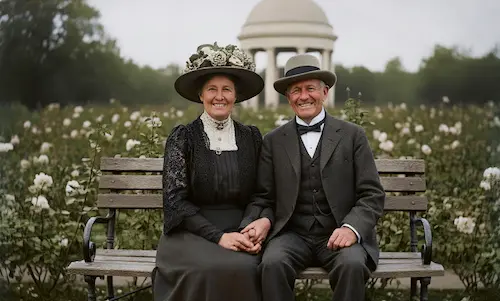
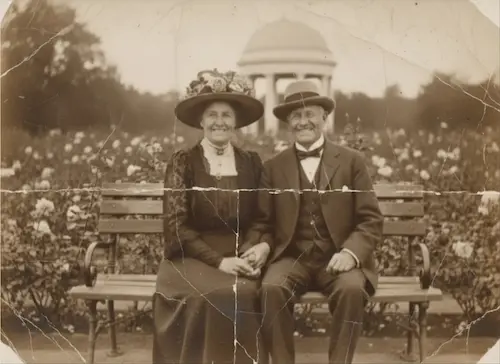
No photo to upload? Click on the examples below to preview the restoration effect.
How Our AI Photo Restoration Works
Unblur, Colorize, and De-scratch with One Click
Seamless Repair, Zero Trace
Whether it's tears, creases, mold, or coffee stains, AI intelligently analyzes surrounding pixels for 'context-aware' filling. It seamlessly restores missing patterns and textures, leaving no trace of repair.
Restore Memories, Not Just Colors
This isn't just 'colorizing black and white'. Our AI analyzes the era, lighting, and physical texture to 'reconstruct' historically accurate colors. Say goodbye to cartoonish tones—embrace lifelike skin tones and ambient lighting.
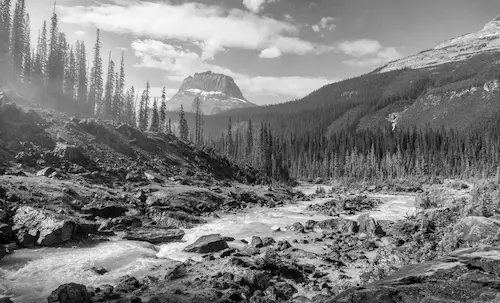
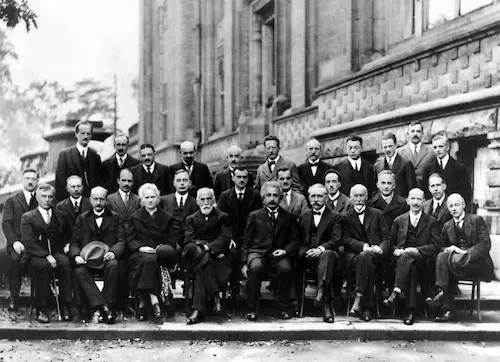
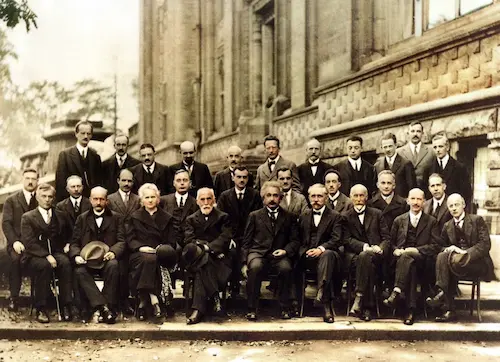
Recreating Scientists' Smiles
See the stunning AI restoration of the 1927 Solvay Conference. Our AI, trained on millions of faces, deeply reconstructs the clear, natural smiles of Einstein & Curie.
Photo Restoration in 3 Easy Steps
Bring your memories back to life in seconds. No sign-up, no complex software. Just upload, process with photo restoration, and download.
1. Upload Photo
Drag & drop a scanned photo. We support JPG, PNG, and WEBP.
2. AI Photo Restoration
Our AI automatically fixes scratches, sharpens details, and colorizes your image.
3. Download & Share
Preview the result and download your restored photo in high-definition.
Choose Your Plan
Flexible credit system - purchase as needed or subscribe, 1 credit per restore
Free Trial
Experience full restore features
- With watermark
- With ads
Monthly Subscription
Best for regular restore needs
- 20 credits per month
- Restore 20 photos/month
- Best price ($0.495/credit)
Monthly Subscription Pro
More credits, better value
- 50 credits per month
- Restore 50 photos/month
- Best price ($0.398/credit)
Frequently Asked Questions
Find answers to the most common questions about our professional AI photo restoration service, helping you better understand our process and technology.
Is my photo secure?
Yes, your privacy and security are our top priorities. All uploaded photos are encrypted and processed securely. We automatically delete your original photos after 24 hours and you have full control to delete the restored images from your account at any time.
What file formats do you support?
We currently support JPG, PNG, and WEBP file formats. The maximum upload size is 10MB per photo.
Is PhotoRestore.ai free?
We offer a free trial that allows you to restore a limited number of photos with watermarks. To download in high-definition and without watermarks, you can choose one of our flexible pricing plans.
What's the difference between 'restoration' and 'enhancement'?
Photo restoration focuses on repairing damages like scratches, tears, and fading, bringing the photo back to its original state. Enhancement goes a step further by improving clarity, resolution, and color balance, making the photo look even better than the original.
How long does the photo restoration process take?
Most photos are processed within 30 to 60 seconds. The exact time may vary depending on the complexity of the damage and the server load.
Is your tool free?
Yes, your first restore is a "gift" - it will enable 100% of our Pro-grade engines completely free. We believe you shouldn't be asked to pay before witnessing the "miracle" yourself. Your first experience will automatically invoke our most powerful AI (deep facial reconstruction, intelligent color restore, etc.), allowing you to truly experience the value of Pro service.
How can I achieve the best "miraculous" restore results?
That's a great question. "Miraculous" results come from combining AI with your "professional preparation". Our AI engine is a world-class "restore expert," not a "guessing expert." It needs you to provide a clear "subject". Pro-Tip: Before uploading, take 5 seconds to do two things: 1. Ensure the photo is oriented correctly so the AI can recognize "up" and "down" properly. 2. Crop out irrelevant backgrounds such as desktop surfaces, photo frames, or scanner edges. This ensures the AI dedicates 100% of its "magic" to restoring your precious faces and memories themselves.
Are my private family photos safe when uploaded?
Absolutely safe. This is our highest principle. Your photos are encrypted upon upload and only processed on AI servers. After processing, both your original photos and restored results will be automatically and permanently deleted within 24 hours. We will never store, share, or use your photos for AI training - this is our solemn commitment to "digital archives."
Do I need to manually select "colorization," "scratch repair," or "face enhancement"?
No. Our "Smart Engine" handles everything automatically for you. An old photo often has multiple issues simultaneously (fading, blurriness, scratches). Our "One-Click Smart Restore ✨" automatically diagnoses the photo and runs all necessary restore engines (faces, colorization, scratches, backgrounds) simultaneously, delivering an "overall perfect" result with one click.
What's the difference between Pro and free versions?
The difference between "basic repair" and "complete reconstruction." The free version provides excellent "standard background noise reduction," superior to regular tools. Pro version unlocks our most expensive, professional AI engines, including: AI Deep Facial Reconstruction - truly "reshapes" facial features rather than just "sharpening"; Intelligent Color Reconstruction - restores "historical" colors, not "cartoon colors"; Watermark-free 4K Download - obtain archive-grade resolution suitable for printing; Professional Mode - unlock manual control over all algorithms.
Can you restore "severely damaged" photos with half a face missing?
We must be honest: AI is close to magic, but it's not magic yet. For scratches, fading, minor tears, and blurriness, AI restore results are remarkably impressive. However, if a photo (especially faces) has large areas of physical loss (e.g., half the face is missing), AI can only "guess" and reconstruct based on algorithms, and the results may not meet your expectations. We recommend trying your "first Pro experience" for free first.
Bring Your Memories Back to Life Today
Transform your precious old photos into stunning restored images with AI Image Restore.